Previous Posts
- Week 9: The Value of Team Feedback
- Week 8: Understanding AI Capabilities
- Week 7: Managing Time and Expectations
- Week 6: Specificity Is Key
- Week 5: Overcoming Setup Challenges
- Week 4: Start With The Big Picture
- Week 3: Designing Around User Needs
- Week 2: Seeking Advice Leads to Success
- Week 1: Staying Productive Through Roadblocks
Goal
- Any bug fixes before the official first demo video.
- Continue renovating features on the app.
- Get the app in an exportable format.
Workflow
I want to get all bug fixes out of the way before I start making visual enhancements to the app. After last week’s intern meeting, we went over how to select different layers in Terrier depending on the model being used. After this conversation, I realized I may have given Claude misleading instructions about where to get data, so I wanted to make sure my app was calling the correct variables I have been referring to.
After multiple tests with Terrier, I realized my app wasn’t plotting what I needed, so I told Claude the correct variable names I wanted to use consistently throughout the app. After this fix, I should no longer experience misleading wind or temperature values anywhere in the app.
Then I started moving on by creating fish icons for each species and rearranging features in the map portion of the app. A few icons were created for each species; each is unique and resembles the features of its fish type in the app. Additionally, I had Claude move my compass toggle to a more convenient location so users can easily toggle all buttons in the app.
Prompts Used
The main goal this week was to test all the new features Claude implemented in last week’s workshop. Before the Intern Showcase, I wanted to make sure my data is auto-uploading and is displaying the correct variables from Terrier in all locations (map, daily and hourly forecasts, trends, etc.). While verifying this, I found a huge bug in my project, and I’m glad I did a last-minute check before recording the demo video.
I asked Claude which variables were plotted for surface temperature and wind, and it explained that no single model data point was plotted; rather, the app was retrieving the most recently updated and available frame in Terrier. This was fundamental in my progress working with FishCast. Had I not checked for this error, I would have essentially been providing unreliable, made-up information. Fortunately, I was able to specify which model I wanted to use continuously and at what level.
Another aspect of the project I worked on this week involved visual enhancements to the app. Last week, I implemented a “per species” fishing index by sampling the most common fish species in Michigan and determining favorable fishing conditions for each. I had an idea to have Claude create different icons that look like each fish species. I did this by uploading a few pictures of each fish so that Claude could create icons from them. Overall, Claude did a great job with this, as each icon seems unique and adds character to the app.
What Worked
I appreciate how Claude can see a picture and produce a different image with key features. I cannot stress enough how visually Claude works and how easy it is for me to create mockup designs, especially for visual enhancements to my app.
What Didn’t Work
Fortunately, I have been able to correct my mistakes with the Terrier data; however, many tests are required before I can comfortably launch the app. From the tests I have done this week, Claude appears to be working with the correct data. However, I have frequently experienced frustration when Claude does not implement these changes across all locations. It often only provides a sample of the corrections I have made, even when I specify that I want to rewrite the app.
Lessons Learned
I have spent weeks trying to ensure Claude is plotting the correct data across all locations in the app. It took a long time to figure out the mistake I made that was allowing Claude to appear to hallucinate data. We get a lot out of these weekly meetings, making sure we are all on the same page and understand how Terrier works. I should have asked how to make this fix sooner, so I am not making a lot of technical changes before my project is presentation-ready.
Images/Video
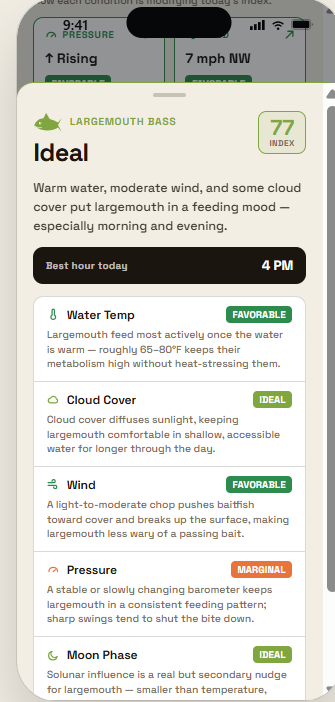
Image 1: Fishing icon for largemouth bass