Goal
- Plot Fishing Index variables on the map using Terrier data
- Work on forecast pages and auto-updates
Workflow
Working on FishCast, I’ve had my most productive week so far after successfully integrating Terrier into the app. I now have temperature, wind speed (including direction vectors), pressure, and cloud cover projected onto MapLibre within FishCast. This was a huge step forward. Not only did it take a while for me and the AI to do this, but it also gave me more ideas for integrating Terrier into different parts of the app. For instance, I also want to plot reflectivity because I think it could give fishermen a clearer picture of the weather, rather than relying solely on Fishing Index variables.
I am still working on the forecasts within the app. I need to make sure that the hourly and daily outlooks are pulling from real-time Terrier data and aren’t hallucinating; I want FishCast to use legitimate values to calculate my version of the Fishing Index. I focused on displaying the data on the map first to visualize what was happening across Michigan and to determine whether it correlated with the index’s findings.
I started working in the Claude Code environment instead of VS Code, and I like the app’s efficiency and safety features. Claude Code has made it easy to feed prompts, expect accurate outputs, and understand how Claude achieves goals and fixes issues.
Prompts Used
Per the recommendation of a fellow intern, I had decided to switch from using the Claude assistant in the VS Code environment to working directly with Claude Code in the app. Last week, I experienced some difficulties with Claude understanding what I asked it to do and then going ahead and building features I didn’t want (almost like a slightly smarter version of Microsoft Copilot). I complained about this in a meeting because I ended up spending more time battling with AI than I did actually getting the project done. It was suggested that I switch back to the app and grant permissions for this project to be developed in Claude Code.
To do this, I asked the VS Code assistant to show me how to export this project. It was an easy push to GitHub (and also a great reminder that I should have done this when I created the project, rather than at a stopping point so progress wouldn’t get lost). However, I did have an API key hard-coded into the backend (for Terrier), so AI recommended I push to GitHub without that information included. Claude rewrote the code to accommodate this change and directed me to implement that key in the Claude environment rather than carry it over via GitHub; it was an easy change and made me feel better about security.
Claude Code prompts have been much easier than the ones I had fed to the Claude assistant. Claude Code never made any changes without my allowing it to, and it was good at troubleshooting and asking me what I wanted instead of guessing and providing a sloppy output. However, this week I realized that if I wanted Claude to do something 100% to my liking, I needed to be very specific so it could process my request. For instance, I had a tough time getting MSLP to plot correctly, and when I did, it was in default units of hPa. Then, there were issues with my colorbar not being within the data range, and it took a decent amount of troubleshooting to figure out how I wanted it to display.
When I finalized how I wanted my display to look, I asked AI to convert pressure units from hPa to inHg. Initially, when AI made this fix, Claude reported that Terrier already had MSLP in inHg stored automatically, so it was easy for Claude to process; however, Claude never updated the colorbar because I didn’t specifically ask it to. Therefore, I had to tell Claude, “Display MSLP in inHg but update the colorbar to match the different contours as you did for units in hPa.” Claude understood this and fulfilled my request.
What Worked
I noticed that working in the Claude app environment was much more efficient, and I produced more productive output than when I told it to do so. Troubleshooting with pressure and understanding how specific I needed to be with Claude Code were key to making my week more productive, because I now know how to apply this practice to other variables. I’m still working on hourly and daily forecast values and making sure they align with the Terrier data that drives the Fishing Index.
What Didn’t Work
Although Claude Code was much more efficient than the Claude assistant in VS Code, I did notice it used a little more credits. I am fine with this because I was getting more done under the credit limitations than I did in the other environment. Even so, the additional productivity outweighed the increased credit usage.
Lessons Learned
I found out I needed to be really specific with Claude Code; otherwise, it won’t produce the exact vision you have. The Claude assistant in VS Code got really good at “guessing” and often just gave me something I didn’t want. AI may be smart, but it’s not smart enough to exactly read my mind yet. Specificity is key.
Images/Video
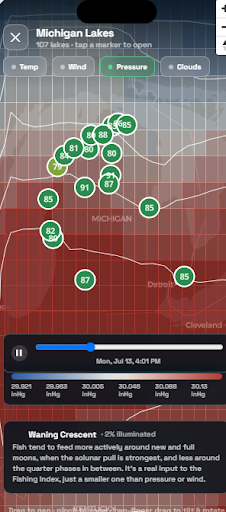
Image 1 (Click to enlarge)