Goal
- Continue developing my interactive design for my fishing app
- Continue researching fishing conditions per meteorological variables
Workflow
I spent the majority of my week working solely in Claude Design, building an interactive app mockup of my fishing app. I worked on one chat throughout the week to continue refining the AI-generated designs to my vision. This week, I was able to create a homepage where you can search for a lake location, a secondary page that gives the fishing forecast for the day, an index disclaimer that discusses each of the weather variables (temperature, pressure…) that affect the fishing index score, a logo for my app, and an app-opener that uses the logo avatar to introduce the platform.
My app, FishCast, provides fishing conditions based on the weather at a given lake in Michigan. Most of my time in Claude Design was spent generating and polishing my secondary forecast page, as there was much work that went into formatting my interactive design. The page includes a daily fishing outlook rating, an hourly fishing forecast, a daily fishing forecast, and a section explaining the weather variables that affect today’s fishing index rating. As this section contained the most information, I spent the most time refining this page’s look and accuracy.
Another app-related project that took a decent amount of time was creating the app opener. I had an idea to create a fish avatar casting a pole and hooking the fishing index, finding it was high in the “excellent” category, making a scared expression, and swimming away. After hours and many spent Claude tokens, AI was able to do this to my liking very well. AI was able to capture the whole gimmick of fish casting (on FishCast), but it struggled to generate an aesthetically pleasing fish from written instructions on its own. Eventually, I was able to circumvent this issue by focusing solely on developing the avatar as a logo and using it in the animation. It seemed as if AI was focusing on too many changes at once, and I had to figure out the pace as it was working.
Overall, I have almost fully developed my app design. I just need to personally adjust my fishing index disclaimer by fact-checking the AI’s weighting of the weather variable system. What variable affects the rating on the fishing index more? Pressure tendency? Wind speed and direction? Temperature change? These conclusions are documented in my research so far and will be further implemented in this upcoming week’s workshops.
Prompts Used
Most of my prompts included me typing directly into the chat what I wanted the output to be, and AI generated what I asked it to (more or less). In most cases, I provided a foundation for AI to build on, and if I wanted changes to the project, I made simple fixes. For example, Claude built me a fishing index bar, but the color gradient did not make sense for the index categories I specified (i.e., “poor,” “moderate,” “excellent…”). Therefore, I asked Claude to provide me with different color palettes and select one that would make the index correspond to a rainbow spectrum, which is standard for most (like AQI).
One thing to note about Claude is that you have a limited number of credits for generating content per multi-hour period. Not all generations take as many credits as others, but for every small detail you tell Claude to add or remove, the credits disappear. I have found it helpful to work on this project in sections at a time, rather than all over the app. This way, if I tell AI I want to start a new page or a larger project on the app, Claude will tell me my credits are almost up. It would be challenging to get started on something else when there wouldn’t be much I could create or fix.
What Worked
It was nice to be able to develop everything I needed for my app right in one chat. It made making changes incredibly simple, knowing how much work I could get done in that environment during the day. Claude Design was good at interpreting my written design ideas, turning them into practical displays, and modifying them if necessary.
What Didn’t Work
I have noticed that AI is more responsive to my written ideas and descriptions in the chat than if I were to upload an image and modify it in detail. When uploading an image, Claude would literally copy and paste it into my workspace, and it would not often auto-modify it at my request. The biggest challenge for this was creating my app-opener. Claude Design seemed unable to get the fish design right, and it got even worse when I tried to upload an image.
Lessons Learned
I should start by creating a large prompt to put into Claude Design first, so it can build a foundation for all the pages I want to create, instead of just one at a time. Therefore, it will use fewer credits and put into perspective which section(s) I need to modify first. Overall, it was a productive week, despite Claude Design taking a while to put some of my ideas into perspective.
Images/Video
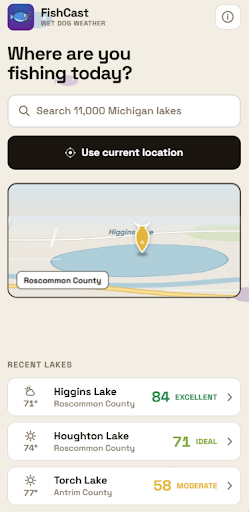
Image 1 (Click to enlarge)
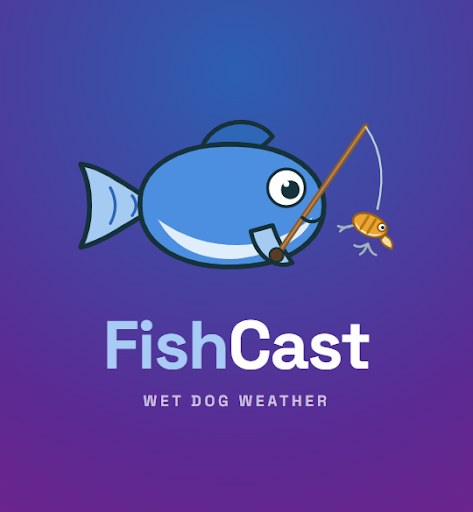
Image 2 (Click to enlarge)
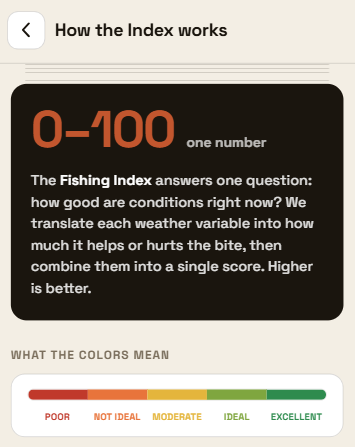
Image 3 (Click to enlarge)