Goal
Research and design a professional storm chasing dashboard using Wet Dog Weather products and Terrier data. The goal was to identify which data is available through Terrier, determine which additional data sources would be required, research the tools and workflows commonly used by storm chasers, create dashboard mockups, and develop a detailed implementation plan and a Replit build prompt.
Workflow
I started the week by researching the tools and data sources commonly used by storm chasers. I looked at products such as RadarScope, SPC Mesoanalysis, HRRR forecast tools, NWS warning products, lightning mapping tools, storm reports, and navigation tools. The goal was to understand what information storm chasers routinely monitor and find ways to combine those products into a single dashboard.
I then looked at the Terrier and MapLibre environment. I reviewed the available Terrier layers to determine which datasets could be used in the dashboard. Once I identified the available Terrier products, I created a list of required storm-chasing datasets that were not currently available through Terrier. I researched potential sources for these datasets and found products available through public NOAA, SPC, NWS, and HRRR data services, as well as those that would require API access or additional integration work.
I spent quite a bit of time on the dashboard design and user experience planning. I generated multiple dashboard designs, switching things up after each generated image. What I wanted to do contained a large amount of information displayed all at once, which created clutter and reduced usability. I eventually settled on a design centered around a large interactive map as the primary workspace, with all meteorological products displayed as toggleable overlays. This reduced the need for multiple browser tabs while keeping the interface clean and focused.
I also designed supporting dashboard elements, including a storm chaser score, route planning, target selection, safety guidance, storm analysis tools, sounding analysis, and navigation support. I spent quite a bit of time figuring out how these elements should interact and what information should be visible at all times vs available through expandable tabs.
When I was researching SPC products, my original plan was to display separate tornado, hail, and wind outlook overlays. Unfortunately, I discovered that SPC product access has changed from individual HTML pages to a single HTML page for the convective outlook, with users able to toggle hail, wind, and tornado. I’ll figure out how to retrieve and display those outlooks properly within the dashboard.
I ended the week with a detailed prompt for Replit that outlines the dashboard architecture, layout, data sources, required integrations, scoring methodology, user interface requirements, and accuracy considerations.
Prompts Used
ChatGPT
Used for:
-
- Researching storm chaser workflows and commonly used tools
- Brainstorming dashboard features and functionality, what would be useful that doesn’t already exist?
- Creating multiple dashboard mockups and layouts
- Evaluating ways to reduce clutter while keeping functionality
- Identifying which Terrier layers could support the dashboard
- Identifying additional data requirements outside of Terrier
- Creating a detailed technical build prompt for Replit that outlines the entire dashboard plan.
What Worked
The dashboard planning process worked well and resulted in a strong concept to move forward with. I identified several Terrier products to incorporate into the dashboard and created a design that keeps the map as the primary focus while still providing access to additional analysis tools.
I also successfully created a detailed dashboard mockup and a comprehensive build prompt that can serve as a starting point for development.
What Didn’t Work
- Some of the data I originally planned to use is not currently available through Terrier and will require additional integrations. I also discovered that accessing and displaying SPC outlook products may be more complicated than originally expected, especially for tornado, hail, and wind outlook overlays. Another challenge was fitting a large amount of weather information into a single dashboard without making it feel cluttered. Several design revisions were needed before arriving at a layout that balanced functionality and usability.
Lessons Learned
I learned that building an effective dashboard is not just about adding more data. The real challenge is organizing information so users can make decisions quickly. I also learned that researching data availability is just as important as designing the dashboard itself because even publicly available products may require additional work to integrate properly.
One of the biggest challenges will be creating an accurate storm chaser score. I do not want the score to increase because an area is under an Enhanced Risk from SPC. The score needs to consider multiple factors, including instability, shear, storm mode, timing, visibility, storm evolution, and other environmental conditions. The challenge will be making sure those variables are weighted appropriately and produce meaningful results. Another challenge will be ensuring that the datasets work together accurately and remain location-specific, so the dashboard provides useful information for the user’s exact location rather than broad regional guidance.
Images/Video
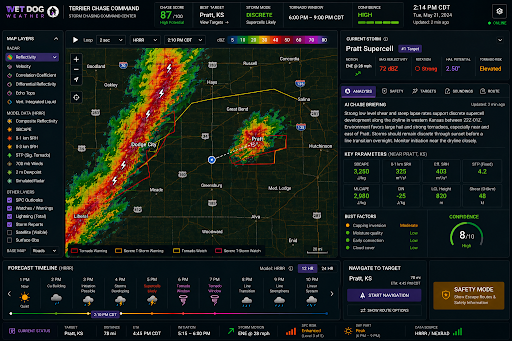
Image 1 (Click to enlarge)