Goal
Continue building the Storm Chaser Command Dashboard by adding more weather data to the MapLibre map, integrating SPC products, and working toward correctly displaying Terrier data.
Workflow
I used ChatGPT to help research data sources for relevant radar information and write detailed prompts for Cursor. I then used Cursor to implement the code, test the features, display the data, and address any issues I encountered. My process was to build a feature, test it in the browser, fix any problems I found, and then continue improving it until it worked the way I wanted. A lot of time this week was spent troubleshooting map overlays from SPC data sources and their alignment with MapLibre, and continuing to try to find Terrier.
Prompts Used
ChatGPT → Cursor
-
- Reduce the number of layer toggles to only include products relevant to storm chasing, although there are still too many.
- Integrate SPC Convective Outlook overlays and Mesoscale Discussions into the MapLibre map.
- Add thermodynamic, kinematic, composite parameter, and observation layer categories using official SPC Mesoanalysis products. Continued prompts to fix state boundary issues.
- Align NOAA/SPC overlays correctly with the MapLibre projection and state boundaries.
- Investigate how to display Terrier layers within the new dashboard while preserving existing functionality, although I have not been successful yet.
- Identify which data can come directly from Wet Dog Weather/Terrier and which layers.
- Begin implementing boundary overlays, including warm fronts, cold fronts, drylines, stationary fronts, outflow boundaries, triple points, surface highs, and surface lows.
What Worked
-
- SPC Convective Outlook overlays are displaying correctly on the map.
- Mesoanalysis categories were added to the sidebar.
- The map overlay alignment issue was significantly improved after correcting the projection to match MapLibre, and it is now displayed correctly. Still have to make sure the actual data is accurate and hasn’t been skewed during alignment to the base map.
Image 1 shows how Cursor was displaying SPC mesoscale analysis information at the start.
In Image 2, we see a successful implementation of SPC Mesoscale Analysis.
What Didn’t Work
-
- Terrier weather layers are still not displaying correctly within the new dashboard. It is still unclear whether these layers should be accessed directly from the GitHub repository or through the Wet Dog Weather API.
- Surface analysis features, like fronts and boundary overlays, are still not displaying accurately. The symbols, positioning, and geometry do not yet match the official NOAA surface analysis products.
- Some layer toggles are present but do not yet display data.
Image 3 shows a screenshot of failed fronts.
Lessons Learned
One thing I learned this week is that displaying weather data is much more complicated than I expected. I thought it would mostly be a matter of pulling the data in and putting it on the map, but every dataset seems to have its own projection, coordinate system, geometry, and update schedule. Even if the data itself is correct, it may still appear incorrectly if it isn’t properly aligned with the MapLibre map. I spent quite a bit of time troubleshooting overlays that were stretched, squashed, or shifted and learned that getting them to match state boundaries accurately is just as important as getting the data itself.
I also realized that before spending hours trying to fix code, it’s important to verify that I’m actually using the correct data source. I ran into several situations where I wasn’t sure whether the information should come directly from the Terrier GitHub repository, via the Wet Dog Weather API, or from official NOAA/SPC products. In the future, I want to spend more time confirming where the data should come from before troubleshooting the implementation. It will save time and make it much easier to build features correctly the first time.
Images/Video
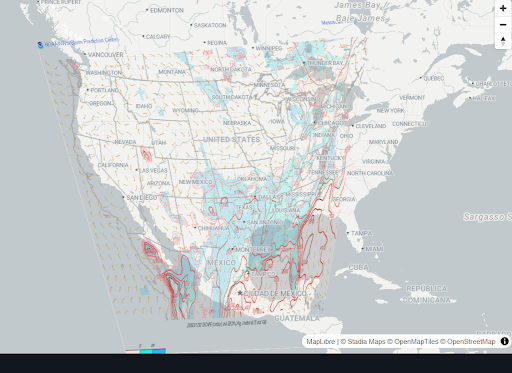
Image 1 (Click to enlarge)
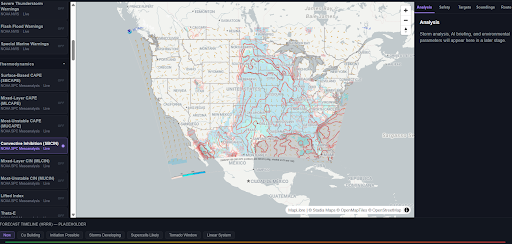
Image 2 (Click to enlarge)
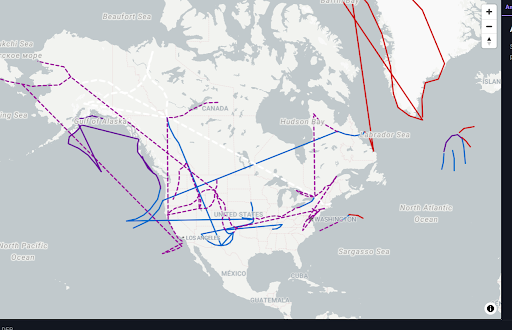
Image 3 (Click to enlarge)