Goal
My goal this week was to get the Terrier data integrated into the new Storm Chaser dashboard and continue building out the core functionality. I also wanted to implement the Chase Score, ensure the radar data contributed to the score, and continue replacing NOAA/SPC data with Terrier data where applicable. Once that was working, I wanted to start preparing the routing portion of the application.
Workflow
I primarily used Cursor for implementation and ChatGPT to help troubleshoot problems that I was having connecting Terrier to the platform. A lot of this week involved trial and error in getting Terrier connected correctly. At first, I was trying to use Terrier Web, but after working with a coworker for a few hours, he identified part of the issue and had me switch to Terrier NPM. Even after switching, a code issue prevented it from working correctly, so he provided a fix that another intern and I implemented. Once that was resolved, Terrier finally loaded correctly. After Terrier was working, I shifted to matching the products I had already built into my Storm Chaser dashboard with the products that Terrier actually provides. That meant replacing NOAA and SPC data sources with Terrier products where they existed while leaving the remaining products connected to official sources. I also worked on making the Chase Score functional by ensuring all available meteorological parameters, including Terrier radar products, fed into the scoring system.
Prompts Used
ChatGPT
- Help me create detailed Cursor prompts to troubleshoot why Terrier data was not loading into the Storm Chaser dashboard.
- Help me determine which storm chasing layers should remain in the application and which could be removed to simplify the interface.
- Help me design a meteorologically sound Chase Score that uses all of the relevant environmental parameters and radar data.
- Help me troubleshoot the map projection of Terrier. (There was a grey background I didn’t like.)
Image 1 shows Terrier working, but the gray background makes other layers harder to view.
Cursor
- Implement Terrier NPM into the Storm Chaser dashboard.
- Replace NOAA/SPC products with Terrier products where available without breaking existing functionality.
- Connect Terrier radar products to the Chase Score, so they contribute to it.
- Build the Chase Score framework and calculate the score using available environmental and radar data.
- Refactor the layer menu to match available Terrier products while preserving existing functionality.
What Worked
Once we switched from Terrier Web to Terrier NPM and implemented the provided code fix, Terrier finally loaded correctly. After that, I was able to start connecting Terrier products to the dashboard instead of relying on NOAA or SPC, where Terrier already had equivalent data. I also got the Chase Score working with the available environmental parameters and Terrier radar data, so all of the major pieces needed for scoring are now connected. The dashboard is beginning to function much more like a complete storm chasing application rather than just individual weather layers.
What Didn’t Work
The biggest challenge this week was getting Terrier connected in the first place. I spent quite a bit of time troubleshooting before David pointed out I was using the wrong repo. Even after switching to Terrier NPM, a bug persisted, preventing it from working until a fix was provided. There was a lot of trial and error before everything finally connected correctly. As a result, less time was spent refining features than I originally planned. After Terrier was finally displayed, the storm chaser score stopped working. It was a back-and-forth between getting the radar included in the score and the score not working at all. I am not sure what kept causing the issue. Also, once Terrier finally loaded, my dashboard layout was altered to show the timeline bar for Terrier. I also noticed the legend is not showing.
Image 2 shows the timeline bar looking funky, with no legend.
Image 3 shows the risk score analysis, where the radar still showed as unavailable, but it was correctly displayed on the map.
Lessons Learned
This week reinforced how important it is to make sure you’re integrating the correct version of a library before spending hours or days troubleshooting. I learned that sometimes the issue isn’t the code, but the implementation I’m building against. Once Terrier was connected correctly, development moved much faster because I could focus on mapping existing dashboard features to the data Terrier actually provides, rather than on resolving connection issues. In the future, my next step is to refine the Chase Score to better reflect real-world storm chasing conditions, then begin building out the routing portion of the dashboard.
Images/Video
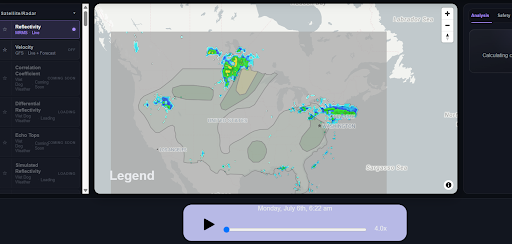
Image 1 (Click to enlarge)
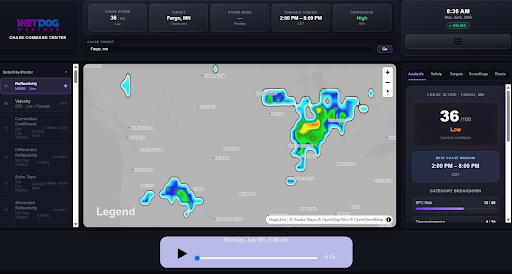
Image 2 (Click to enlarge)
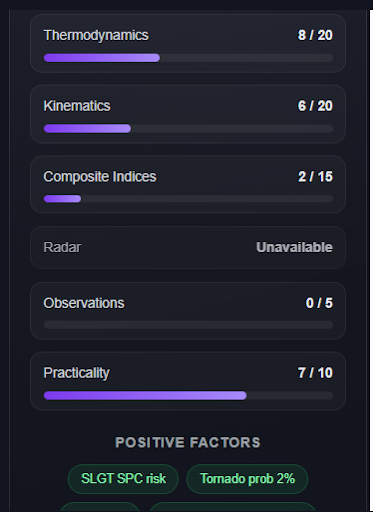
Image 3 (Click to enlarge)