We make a visual toolkit for weather called Terrier. It’s tied to our own data processing because we need the data processed in a certain way to feed it. It’s also much easier to sell a weather data processing platform than it is to sell visualization. One of the things that Terrier does is power an animated wind display, and wind is a lot of fun to visualize.
Wind turns out to be one of the more interesting aspects of weather. It needs to communicate direction and intensity clearly, react quickly, and still look good whether you’re zooming around a map or watching conditions change over time.
How Our Animated Wind Display Works
On the web, at the moment, we display wind like this.
This loads fast, looks pretty good, and expresses what our users want in a coherent way. Those arrows are WebGL shader-based, so they’re nice and zippy, reacting to whatever is going on. For the web, this version of our animated wind display strikes a pretty good balance between performance and clarity.
But on mobile? Oh, our wind display on iOS is absolutely gorgeous.
It looked great before, but a few months ago, we solved the last issue on our list: animating data.
Animating Directional Data is Tricky
Wind is two components: an X direction and a Y direction. Technically, it’s 3 if you include Z, but most models don’t provide that, so we stick with X and Y. It’s a vector.
There are many ways to display vectors in both static and animated displays. For static, my personal favorite is wind barbs. That one’s fun to do in real time… but maybe a bit silly. For animated displays, the industry uses arrows or particles.
Arrows, we’ve seen above. They’ve got a direction, a size to indicate intensity, and if you’re feeling fancy: a color. Since they’re semi-transparent, you can put data under them as well. Maybe wind intensity by color, maybe something else. Up to you, really.
Much more fun is wind particles or streamlines. One kinda blends into the other depending on how you do it. Ours are somewhere in between.
Wind particles are popular in weather apps and websites. The simplest version isn’t too hard to implement, but it gets much trickier when you add multiple data sets and motion.
Wind particles are popular in weather apps and websites. The simplest version isn’t too hard to implement, but it gets much trickier when you add multiple data sets and motion. Building an animated wind display that feels smooth and logical while combining different datasets is where things become difficult.
Multiple data sets are a problem we solved long ago. We can combine global and regional wind fields on the fly using graphics hardware. What we hadn’t figured out was animation.
Building a Better Animated Wind Display
In my opinion, data displays should be continuous. If you zoom in on the data, it should maintain the display you saw as it adds new elements at the new resolution. If the data animates, so should the display, and we were falling short in that regard.
Our Terrier weather display (for mobile) switched to arrows when you animated.
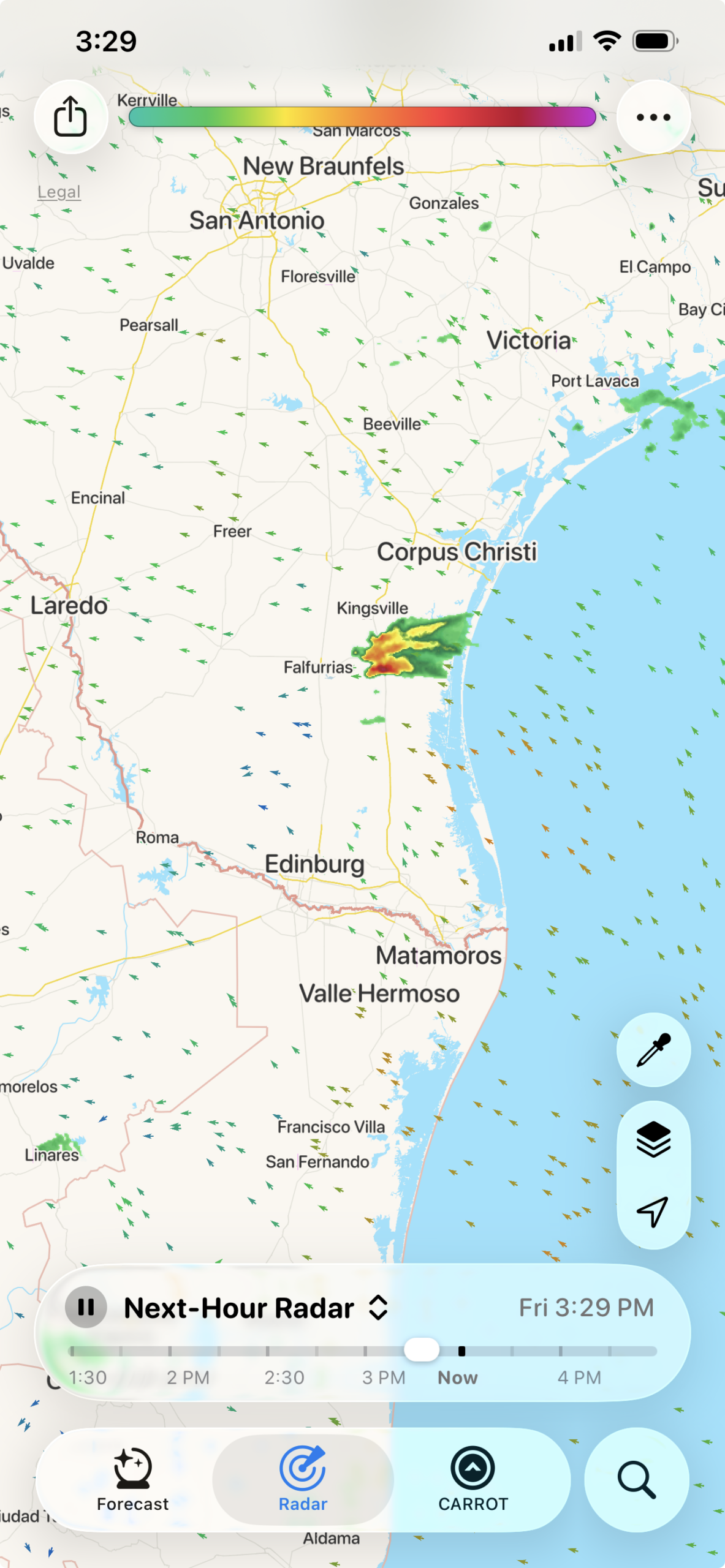
A fine tradeoff, but a cheat. I always wanted something continuous. Zoom in, zoom out, hit play, hit pause, and nothing stops, nothing hesitates, and nothing changes form. We checked all the other boxes, and a few months ago, we finally checked that last one.
Describing our animated wind display in words is silly. Let’s just look at the video again.
The trick is that the particles aren’t particles at all. They’re streamlines and they lay themselves out every frame. The result is smooth, logical, and everything I’d wanted for years.
Mobile Vs Web
If you’re using Terrier for mobile, you should upgrade! This looks amazing and is easy to use. If you’re using Terrier for web, that’s trickier.
It’s easier to do this kind of stuff on Apple devices. The graphics SDK, Metal, makes it all much easier to implement than the web equivalent. So this doesn’t translate immediately. It’s actually going to be kind of a pain. But if you’d like the same animated wind display experience for Terrier (Web), reach out and let us know.