
Previous Posts
Goal
Continue building out my athlete dashboard by adding trail analysis functionality, connecting environmental data to specific trails, refining the map controls, and updating the timeline.
Workflow
This week, I continued working on the athlete dashboard in Replit, using Terrier as the environmental mapping platform. My focus was on making the trail data interactive and directly linking environmental conditions to individual trails. I worked on displaying trails on the map and making them clickable so users could view trail names, types, and current conditions. I added an Analyze Trail workflow button at the bottom of the selected-trail dashboard that lets users analyze selected trails and view information specific to each route, rather than just looking at the map as a whole.
A large part of the week involved troubleshooting the connection between the environmental data and the trails. The goal was to integrate the selected trail work into the map timeline so users could see how air quality conditions would change along that trail at future forecast times. I was able to get the trail selection and analysis workflow working, but I ran into issues displaying the environmental data correctly without breaking the map functionality.
I also improved the map controls by removing the historical timeline and limiting it to current and future conditions, which is more useful for athletes planning outdoor activities. I also continued to cross-check data accuracy.
I tested Figma Make to compare it with Replit for design and development tasks. I continued using ChatGPT for troubleshooting, generating design ideas, and creating prompts.
My first image, shown below, shows that the selection and route feature is working.
Prompts Used
Replit
- Ensure all available trials are visible on the map with specific trail information.
- Make trails clickable and display trail information.
- Create an Analyze Trail workflow that shows AQI and smoke data matching the dashboard, specific to the trail, and is animated along with the dashboard.
- Connect environmental data to selected trails.
- Limit the timeline to current and future forecast hours only.
- Create separate icons for walking, cycling, and multi-use trails.
ChatGPT
- Troubleshooting map and trail integration issues. When a trail is selected, it accurately displays the current conditions, but the trail analysis should align with the dashboard map. I need a detailed prompt for Replit that achieves this.
- The data is showing effectively on the trails, but has disappeared on the map. I need a Replit prompt that ensures the data is displayed accurately in both locations.
Figma Make
- Tested the initial full prompt-based dashboard to generate design (this did not go well).
What Worked
- Successfully displayed all publicly available trail data on the map.
- Made trails clickable and interactive, showing current AQI and smoke conditions as well as trail details.
- Added trail names and trail classifications.
- Built an Analyze Trail workflow.
- Removed historical timeline data and limited the timeline to current and future forecasts.
In my second image, the overall current conditions and training score for the user’s specific area were successful.
What Didn’t Work
- I couldn’t get the environmental forecast data to follow the selected trail through the timeline without breaking the map.
- When I connected the environmental data to the trail analysis, the map often stopped working correctly.
- After fixing the map, the trail analysis would no longer display data.
- Temperature visualizations sometimes appeared inconsistent with actual conditions. For example, temperatures were in the 60s, while the map displayed colors suggesting temperatures in the 80s or higher.
- I was not able to get the graph visually showing data along a route to display.
- Figma Make was very limited and did not do a good job translating prompts into usable dashboard designs.
- Even with the Replit subscription, there were still limitations and additional usage costs when making frequent changes and testing features.
In this image, shown below, you can see that when the analyze trail button is selected, the trail data does not work.
In my next image, you can see that the graph generation for the analyzed trail data is not working, but the summary of when to go and the days’ temps/UV/AQI data during that time are functional.
Lessons Learned
This week, I learned that displaying environmental data on a map is much easier than connecting that data to specific routes and making it useful for decision-making. Getting trails to display and be interactive was fairly straightforward, but accurately tying forecast data to those trails while keeping everything functional was much more challenging. I also learned the importance of validating environmental data rather than assuming it displays correctly just because the map loads successfully. I am not sure whether this is a coordinate issue or whether the time is in UTC and is not being converted to the local time zone. Still a few things to work on to make the platform function the way I wanted.
Images/Video
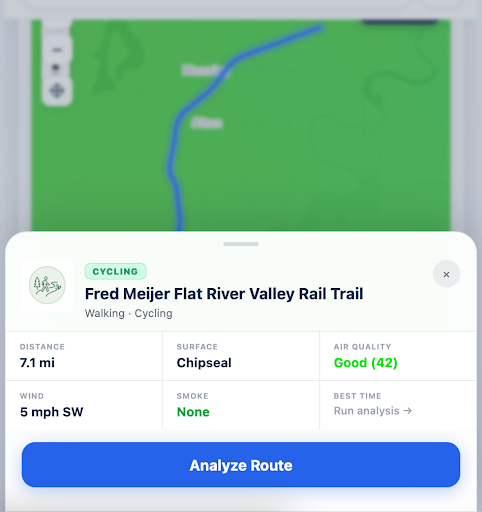
Image 1 (Click to enlarge)
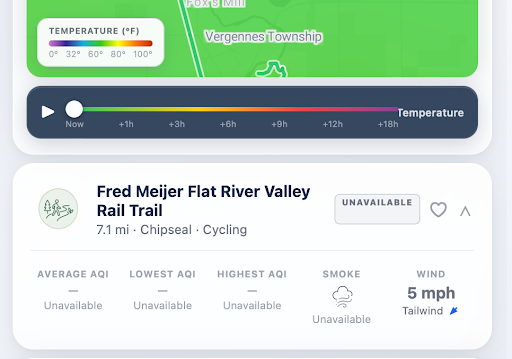
Image 3 (Click to enlarge)
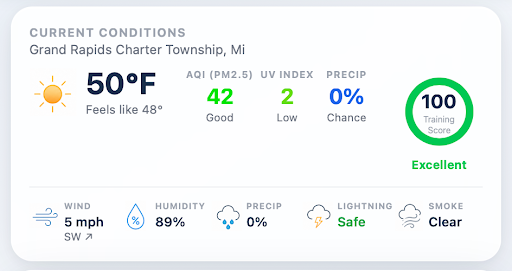
Image 2 (Click to enlarge)
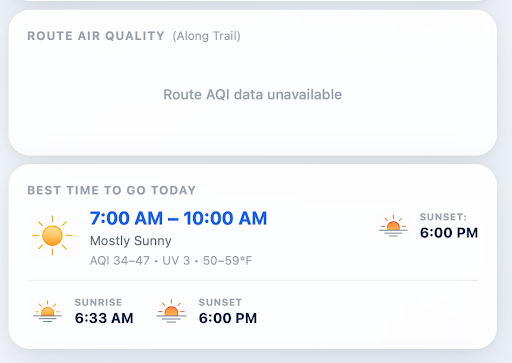
Image 4 (Click to enlarge)